Best GitHub Copilot Alternatives in 2026
The strongest GitHub Copilot replacements right now are Cursor (best overall paid IDE), Cline and Continue (best free + open source), Tabby (best self-hosted), JetBrains AI (best for IntelliJ-family IDEs), Claude Code (best autonomous CLI agent), and Amazon Q Developer (best for AWS shops). Compare all 58 tools below — by price, IDE support, license, and how each one differs from Copilot.
Last full audit: April 28, 2026 — see methodology.
⚡ Why developers are searching for Copilot alternatives this month
Two things happened in April 2026 that changed the calculus on GitHub Copilot:
- April 20, 2026 — GitHub paused new sign-ups for Copilot Pro, Pro+, and Student plans. GitHub cited agentic-workflow load on its infrastructure. Existing subscribers keep their plans; new individual customers cannot subscribe to Pro tiers right now.
- June 1, 2026 — All Copilot plans move from request-based billing to usage-based billing. Premium Request Units (PRUs) are replaced by GitHub AI Credits, priced per token consumed. Plan prices stay the same, but agentic features (chat, Workspace, code review) now meter against your credit allowance. Code completions and Next Edit Suggestions remain unmetered.
GitHub's own community discussion thread collected reports from teams modelling 10–18× higher monthly bills under the new structure for agent-heavy workflows. Whether or not those projections hold, the predictability of Copilot's pricing is gone — which is the variable many teams optimize for.
If your bottleneck was inline completion, Copilot is still excellent and the change costs you nothing. If your bottleneck is agent runs, multi-file edits, or PR review, this is the right moment to evaluate alternatives.
GitHub Copilot vs. the alternatives — at a glance
The 12 most-evaluated Copilot replacements, sorted by category. From-price is the cheapest entry point a working developer can actually use. BYOK = bring your own API key (you pay the model provider directly).
| Tool |
From |
Free tier |
Open source |
Self-host |
Primary IDEs |
Agent mode |
BYOK |
How it differs from Copilot |
| GitHub Copilot (baseline) |
$10/mo Pro¹ |
Yes |
No |
No |
VS Code, JetBrains, Visual Studio, Vim/Neovim, Xcode, Eclipse |
Yes (Workspace) |
No |
The default; tightest GitHub-ecosystem fit |
| Cursor |
$20/mo Pro |
Yes |
No |
No |
Cursor (VS Code fork) |
Yes |
Yes (on Pro+) |
Stronger multi-file context and Composer-style agent |
| Cline |
$0 + API |
Yes (BYOK) |
Apache 2.0 |
Client-side |
VS Code, JetBrains |
Yes (Plan/Act) |
Required |
Open-source agent, zero markup on API spend |
| Continue |
$0 + API |
Yes (BYOK) |
Apache 2.0 |
Yes |
VS Code, JetBrains |
Limited |
Required |
Most flexible model-router; chat + completion |
| Tabby |
$0 (self-host) |
Yes |
Apache 2.0 |
Required |
VS Code, JetBrains, Vim |
Limited |
n/a |
The reference self-hosted Copilot replacement |
| Tabnine |
Free tier; Pro paid |
Yes |
No (proprietary) |
Yes (Enterprise) |
VS Code, JetBrains, 20+ others |
Yes |
Enterprise |
Privacy-first; can train on your private codebase |
| JetBrains AI |
Free + credits |
Yes |
No |
Local models supported |
All JetBrains IDEs |
Yes (Junie) |
Yes (local LLMs) |
The native answer if you live in IntelliJ/PyCharm/etc. |
| Claude Code |
Anthropic plan / API |
No |
Closed |
No |
Terminal |
Yes (default) |
Yes |
Terminal-native autonomous agent with full repo awareness |
| Amazon Q Developer |
Free; Pro $19/mo |
Yes |
No |
AWS-resident |
VS Code, JetBrains, AWS Cloud9 |
Yes |
No |
AWS-native; reference tracker for license attribution |
| Windsurf |
$15/mo |
Yes |
No |
No |
Windsurf (VS Code fork) |
Yes (Cascade) |
No |
Strongest "agent + autocomplete in one flow" UX |
| Aider |
$0 + API |
Yes (BYOK) |
Apache 2.0 |
Yes |
Terminal |
Yes |
Required |
Git-native CLI pair-programmer; every change = a commit |
| Amp |
Token-based |
Trial |
No |
Yes (Enterprise) |
VS Code, JetBrains |
Yes |
No |
Sourcegraph-grade codebase awareness; no token caps |
| Codeium / Windsurf Plugin |
Free |
Yes |
No |
Enterprise |
40+ editors |
Limited |
No |
Broadest editor coverage of any free option |
¹ Copilot Pro is currently paused for new sign-ups (April 20, 2026). Existing subscribers retain access. Business and Enterprise remain available at $19 and $39/user/month.
Which one should you pick? A 30-second decision guide
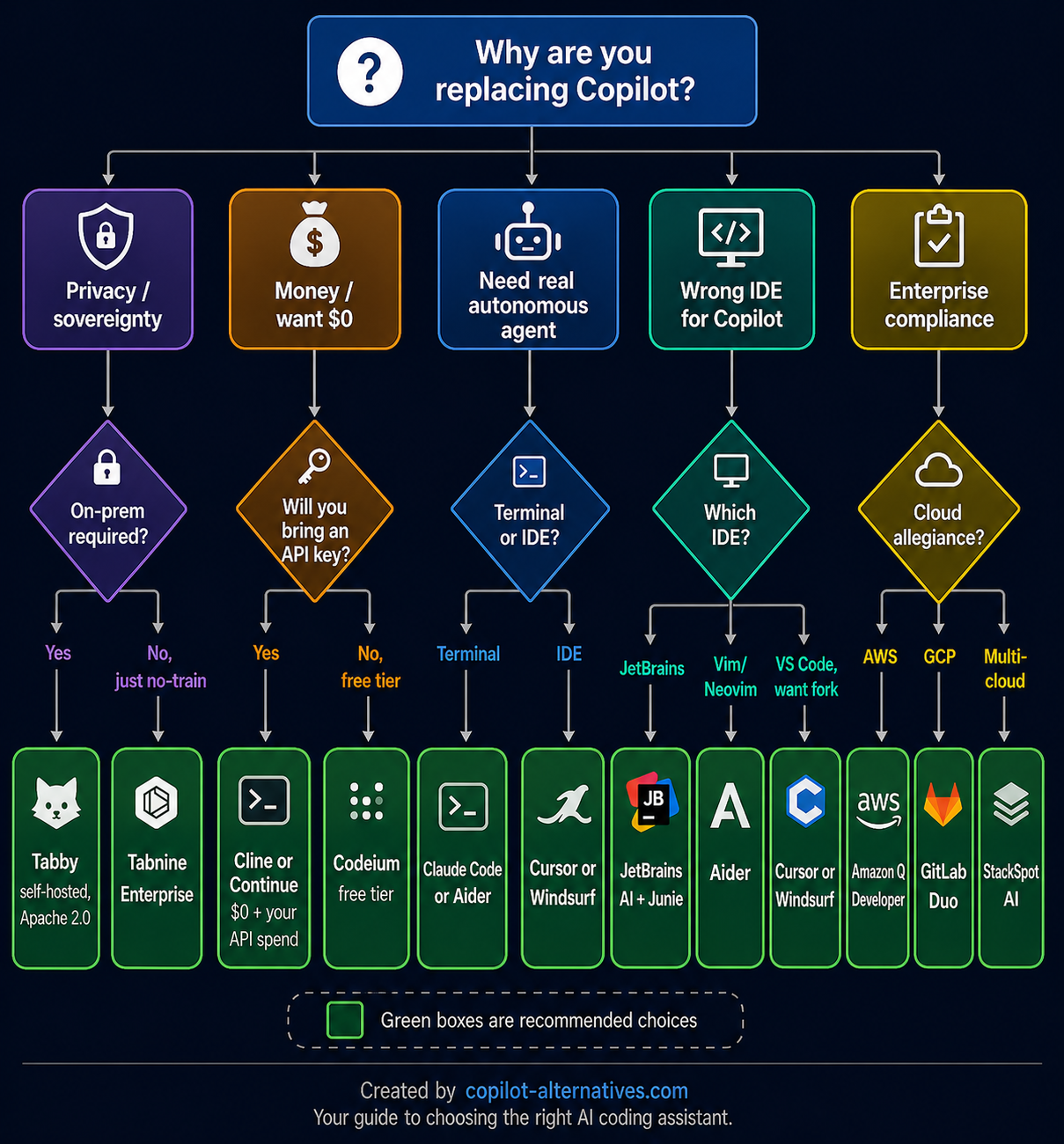
The branches above lead to a single recommendation per scenario. If yours doesn't fit, scroll the curated lists below — they map every common context.
Best Copilot alternatives by use case
🆓 Best free GitHub Copilot alternatives
If your goal is to spend $0/month, four real options exist in 2026:
- Cline — Open-source agent that runs inside VS Code or any JetBrains IDE. You bring your own API key (Anthropic, OpenAI, Gemini, DeepSeek, or local models via Ollama). Cline charges no markup; your spend equals the model provider's price list. It's the strongest free option for autonomous, multi-file work.
- Continue — Open-source assistant for VS Code and JetBrains with chat, autocomplete, and the most flexible model router on this list. Same BYOK model as Cline.
- Aider — Terminal-native pair programmer that turns every AI change into a git commit. Best for developers who already live in
tmux and the shell.
- Codeium (now part of Windsurf) — The only mainstream option with a genuinely useful free tier without requiring an API key. Coverage extends to 40+ editors including Vim, Emacs, and Sublime — broader than Copilot itself.
For the full list of zero-cost options, see /ide-extensions/.
🔓 Best open-source / self-hosted alternatives
If your code can't leave your infrastructure:
- Tabby — The reference self-hosted Copilot. Apache 2.0, runs on a single consumer GPU (T4-class works for 1B–3B models), supports VS Code, JetBrains, and Vim. Pick this when on-prem deployment is non-negotiable.
- FauxPilot — Self-hosted server using SalesForce CodeGen models on NVIDIA Triton. Fully offline, zero subscription cost, MIT-licensed. Less polished than Tabby but proven in air-gapped deployments.
- Continue — Open source on the client side; pair it with a self-hosted model server (vLLM, Ollama, LM Studio) and your code never leaves your network.
- Tabnine Enterprise — Not open source, but offers full self-hosted deployment with custom model training on your private codebase. The path of least resistance for regulated industries that need audited support.
🤖 Best autonomous coding agents
For tasks where you describe an outcome and the tool ships a PR:
- Claude Code — Anthropic's terminal-native agent. Strongest reasoning on the list; runs as a daemon, edits across files, executes commands. Best fit if you've already standardized on Claude Sonnet/Opus.
- OpenAI Codex CLI — Apache 2.0 CLI agent from OpenAI. Multi-file edits, shell execution, runs in your terminal with your API key.
- Cursor — Composer/Agent mode is the most polished IDE-resident agent experience.
- Windsurf — Cascade combines an agent and inline completion in one flow; less context-switching than the others.
- Cline — Open-source, transparent agent inside VS Code. Plan/Act modes give you human-in-the-loop control on every action.
- Jules — Google's asynchronous agent powered by Gemini; integrates with GitHub directly and submits PRs.
The full category lives at /cli-agents/.
💼 Best for JetBrains IDEs
Copilot works in JetBrains, but the best-in-class JetBrains experience is native:
- JetBrains AI — Built-in across IntelliJ IDEA, PyCharm, WebStorm, GoLand, Rider, and the rest. Includes Junie (the autonomous agent), unlimited free completion via JetBrains' Mellum model, multi-model cloud access (Claude, GPT, Gemini), and full offline mode with local models via Ollama or LM Studio.
- Tabnine — 20+ IDE coverage including all JetBrains products; strong privacy posture.
- Cline — Now ships natively in IntelliJ IDEA, PyCharm, and WebStorm with the same agent capabilities as the VS Code build.
- Sweep AI — JetBrains-first; 4.9-star rating on the JetBrains Marketplace with 40,000+ installs.
🏢 Best for enterprise compliance
When procurement is the gating factor:
- Amazon Q Developer — AWS-native, IAM-integrated, license-reference-tracked, SOC 2.
- Tabnine Enterprise — Self-hosted, custom model training, zero-retention guarantee.
- StackSpot AI — Multi-agent platform with PCI-DSS, HIPAA, and ISO 27001 compliance plus company-specific Knowledge Sources.
- GitLab Duo — Native to GitLab DevSecOps; the cleanest answer if your org runs GitLab end-to-end.
- Blackbox AI — On-premises deployment, multi-agent execution, supports 35+ IDEs.
🖥️ Best CLI / terminal-native alternatives
Developers who live in the shell have more good options than ever:
🧠 Best for large / monorepo codebases
Copilot's weakest axis is whole-repo context. These tools fix it:
- Jolt AI — Purpose-built for production codebases between 100K and several million lines.
- Amp — Sourcegraph's agent; zero token caps and the broadest indexing engine on this list.
- Zencoder — Repo-Grokking analyzes your full project's structural patterns.
- Pieces for Developers — Long-term memory layer that captures context from browsers, IDEs, and chat tools.
🎨 What about Lovable, v0, Bolt, and Base44?
These are listed in our /ai-app-builders/ category but they're a different category than Copilot replacements. Tools like Lovable, v0 by Vercel, Bolt, Base44, Pythagora, DhiWise, and UI Bakery generate complete web apps from a prompt — they don't sit inside your IDE and complete code as you type. If your job is shipping standalone apps from natural language, they're excellent. If your job is being faster inside an existing codebase, they're not what you want.
What is GitHub Copilot in 2026? (the baseline)
GitHub Copilot is the AI pair-programmer launched in 2021 by GitHub and OpenAI, now reportedly used by over four million paid subscribers. Its current model lineup includes GPT-5 family, Claude Sonnet, and Gemini variants, exposed through three feature surfaces: inline completion (the original product), Copilot Chat (Q&A and refactoring), and Copilot Workspace / Agent mode (multi-file autonomous tasks). Editor coverage spans VS Code, Visual Studio, JetBrains IDEs, Vim/Neovim, Xcode, Eclipse, and Azure Data Studio.
Pricing as of April 28, 2026 (per GitHub's plans page and the usage-based billing announcement):
| Plan |
Monthly price |
Status |
| Free |
$0 |
Limited completions/chat |
| Pro |
$10/user |
New sign-ups paused April 20, 2026; existing users continue |
| Pro+ |
$39/user |
New sign-ups paused April 20, 2026; existing users continue |
| Business |
$19/user |
Available; moving to usage-based June 1, 2026 |
| Enterprise |
$39/user |
Available; codebase indexing + custom models |
Code completions and Next Edit Suggestions stay unmetered after the June 1 transition. Everything else — chat, agents, code review — meters against monthly GitHub AI Credits, with overage billable at published model rates.
That's the product the alternatives in this directory are measured against.
When NOT to switch from Copilot
Counter-positioning matters. Stay on Copilot if any of these are true:
- Your stack is GitHub-native end-to-end. GitHub Actions, GitHub Issues, GitHub Projects, Copilot Workspace, Copilot for PR review — the integration tax for moving off is real, and the gain from a competitor in this scenario is usually marginal.
- Inline completion is your only AI need. Copilot's completion quality is competitive with everything on this list, and after June 1 it's still unmetered. If you don't run agents or chat heavily, the upcoming pricing change costs you nothing.
- You already pay for Copilot Enterprise's codebase indexing. Replacing that capability with Tabnine Enterprise or Amp is a sensible move only if you actually use the indexing — otherwise you're paying twice for a feature you don't need.
- Your developers refuse another tool. Adoption matters more than features. A tool nobody opens has zero ROI.
For everyone else — especially teams that have noticed credit consumption climb on Copilot Pro+, or organizations with privacy or self-host requirements — a deliberate evaluation is overdue.
Browse the full directory
We list 58 GitHub Copilot alternatives across four categories. Pick by tool type:
- AI IDEs — purpose-built editors with AI as a core feature (Cursor, Windsurf, Zed, Void, TRAE, PearAI, Aide, Melty, CodeEdit, MarsCode)
- IDE Extensions — plugins for VS Code, JetBrains, and others (Cline, Continue, Tabnine, Tabby, Roo Code, Kilo Code, JetBrains AI, Amp, Qodo, Zencoder, Jolt AI, CodeRabbit, Sourcery, Sweep AI, Sider, Phind, StackSpot AI, Blackbox AI, Pieces for Developers, FauxPilot)
- CLI Agents — terminal-native autonomous coding (Claude Code, Aider, OpenAI Codex CLI, Cursor CLI, Plandex, Goose, Warp, Opcode, Amazon Q Developer, GitLab Duo, Jules)
- AI App Builders (adjacent category) — prompt-to-app generators (Lovable, v0 by Vercel, Bolt, Base44, Pythagora, DhiWise, UI Bakery)
Methodology
Each tool in this directory is evaluated on six axes:
- Pricing transparency — published price list, free tier reality, BYOK availability
- IDE coverage — primary editors supported, depth of integration
- License openness — open source, source-available, or closed
- Agent capability — multi-file edits, terminal execution, autonomous PRs
- Codebase context — repo-level indexing, RAG, monorepo support
- Active development in 2026 — release cadence, model lineup currency
Listings are reviewed at minimum quarterly. Each detail page shows a "last reviewed" date. The numeric badge on the homepage card indicates editor's score (0–2): 0 = listed for completeness, 1 = recommended for specific use cases, 2 = top pick in its category.
Pricing data is checked against vendor pricing pages on the date shown. We don't rank by affiliate payout — when we link a tool above as a "best for" pick, that's an editorial judgment, not a paid placement.
FAQ
Is there a free alternative to GitHub Copilot?
Yes, several. The strongest free paths are: Codeium (free tier, no API key required, 40+ editors), Cline or Continue (open source + your own API key — total cost equals what you'd pay Anthropic, OpenAI, or DeepSeek directly), and Tabby (free if you self-host on a GPU you already own). Aider is the equivalent option for terminal users.
Which GitHub Copilot alternative is fully open source?
Tabby, FauxPilot, Continue, Cline, Aider, Roo Code, Kilo Code, Goose, OpenAI Codex CLI, Void, PearAI, Aide, CodeEdit, and Melty are all open source under permissive licenses. They differ on how much of the model is open versus how much of the client; most pair an open client with closed frontier models you bring yourself.
Can I self-host a Copilot alternative on-premises?
Yes. Tabby and FauxPilot are designed for full on-premises deployment and run on commodity GPUs. Tabnine Enterprise offers a managed self-hosted option with vendor support. Continue plus a local LLM server (Ollama, vLLM) is the lightest-weight path if you want open source end-to-end.
What's the best Copilot alternative for JetBrains?
JetBrains AI is the native answer — unlimited free completion via JetBrains' own Mellum model, multi-cloud LLM access, and the Junie autonomous agent. Tabnine, Cline, and Sweep AI are the strongest third-party options.
How much does Cursor cost compared to Copilot?
Cursor Pro is $20/month versus Copilot Pro at $10/month. The reason developers pay double is multi-file context, the Composer agent, and Cursor's faster ship cadence on frontier features. After Copilot's June 1, 2026 move to usage-based billing, the effective cost difference will narrow for agent-heavy users.
Will GitHub Copilot's June 2026 pricing change actually make it more expensive?
For light users — completion + occasional chat — no. Code completions and Next Edit Suggestions remain unmetered. For heavy agent users — Copilot Workspace, multi-step chat, code review — yes, often substantially. The honest move is to install Copilot's new billing dashboard (rolling out early May 2026) and model your last 30 days of usage against the published per-token rates before deciding.
Cursor vs. GitHub Copilot — which one is better?
They optimize for different things. Copilot wins on inline completion latency, GitHub-ecosystem fit, and predictable pricing for completion-only workflows. Cursor wins on multi-file editing, Composer-style agent runs, and willingness to ship new model features fast. Most teams that move from Copilot to Cursor do so because they need cross-file refactors that Copilot's window-of-context can't handle.
What's the difference between an AI coding assistant and an AI app builder like Lovable or v0?
A coding assistant (Cursor, Cline, Tabnine) sits inside your IDE and helps you write or modify code in an existing project. An AI app builder (Lovable, v0, Bolt, Base44) takes a natural-language prompt and generates a complete deployed web app from scratch. They serve different jobs and shouldn't be evaluated against each other.
This directory is independent. We are not affiliated with, sponsored by, or endorsed by GitHub, Microsoft, OpenAI, Anthropic, or any vendor listed. All product names and trademarks are property of their respective owners. Spotted a pricing change or a missing tool? Contact us.