GitHub Copilot Alternatives — IDE Extensions (Compared for 2026)
What this page is. A maintained shortlist of 19 IDE-extension alternatives to GitHub Copilot — plugins for VS Code, JetBrains, and Visual Studio that compete with Copilot on price, privacy, model choice, or agent capability.
What this page isn't. Full AI-native IDEs (Cursor, Windsurf, Zed) live in AI IDEs. Terminal-only agents (Claude Code, Aider, OpenAI Codex CLI) live in CLI Agents. End-to-end app generators live in AI App Builders.
Last reviewed: April 2026.
TL;DR — Top 3 picks for 2026
| Pick |
Tool |
Why |
| Best overall |
Cody |
Multi-IDE (VS Code, JetBrains, Visual Studio), multi-model (Claude, GPT-4o, Gemini), multi-repo context via Sourcegraph Search API. Closest like-for-like to Copilot with more model flexibility. |
| Best free / BYOK |
Cline |
Open-source agent in VS Code with direct access to frontier models. You pay the model provider directly (BYOK), no subscription. Roo Code and Kilo Code are close runners-up. |
| Best for privacy / self-hosted |
Refact.ai |
Open-source, self-hosted, zero telemetry, supports Claude 4 / GPT-4.1 / Gemini 2.5 Pro, and lets you fine-tune on your own codebase. Tabnine and StackSpot AI are the enterprise-grade alternatives. |
Need a deeper differentiator than these three? Skip to the comparison table or the decision tree.
Comparison table {#comparison-table}
The five axes that actually drive selection: host IDE coverage, entry pricing, license, primary model(s), and capability tier (inline completion / chat / agentic / code review). BYOK = "bring your own API key" — pay the model provider directly, no platform subscription.
| Tool |
Host IDEs |
Entry pricing |
License |
Primary model(s) |
Capability |
BYOK |
| Cline |
VS Code |
Free + BYOK |
Open-source |
Claude, GPT, Gemini, frontier models |
Agentic |
✅ |
| Roo Code |
VS Code |
Free + BYOK |
Open-source |
Multi-model |
Agentic, custom modes |
✅ |
| Kilo Code |
VS Code |
Free + BYOK (transparent) |
Open-source |
Multi-model |
Agentic |
✅ |
| Refact.ai |
VS Code, JetBrains |
Free + Self-hosted |
Open-source |
Claude 4, GPT-4.1, Gemini 2.5 Pro, fine-tunable |
Agentic, completion |
✅ |
| Tabnine |
VS Code, JetBrains, Visual Studio, Vim, more |
Free + Paid + Enterprise (self-hosted) |
Proprietary |
Tabnine + customer-owned |
Completion, chat |
— |
| Cody |
VS Code, JetBrains, Visual Studio |
Free + Paid + Enterprise |
Proprietary |
Claude, GPT-4o, Gemini |
Chat, completion, multi-repo context |
— |
| JetBrains AI |
JetBrains IDEs only |
Paid (free tier limited) |
Proprietary |
Multi-model + offline option |
Completion, chat |
— |
| Sweep AI |
JetBrains |
Free + Paid (Privacy Mode all plans) |
Proprietary |
Multi-model |
Next-edit autocomplete, agent |
— |
| Bito |
VS Code, JetBrains |
Free + Paid |
Proprietary |
Multi-model |
Chat, code review, knowledge graph |
— |
| Sourcery |
VS Code, JetBrains, more |
Free + Paid |
Proprietary |
Sourcery + LLM |
Code review, refactor |
— |
| CodeRabbit |
GitHub/GitLab/Azure DevOps + IDE |
Paid |
Proprietary |
Multi-model |
PR-level code review |
— |
| Qodo |
VS Code, JetBrains |
Free + Paid |
Proprietary |
Multi-model |
Generation, testing, review |
— |
| Augment Code |
VS Code, JetBrains + CLI |
Paid |
Proprietary |
Multi-model + Context Engine |
Agentic, GitHub PR review, codebase index |
— |
| Amazon Q Developer |
VS Code, JetBrains, Visual Studio, AWS Console |
Free + Paid |
Proprietary |
Amazon-trained + multi-model |
Completion, chat, AWS-aware agent |
— |
| Gemini Code Assist |
VS Code, JetBrains, GCP |
Generous free tier + Paid |
Proprietary |
Gemini 2.5 (1M token context) |
Completion, chat, agent |
— |
| Supermaven |
VS Code, JetBrains, Neovim |
Free + Pro |
Proprietary |
Supermaven (1M token context, <250 ms) |
Ultra-fast completion |
— |
| StackSpot AI |
VS Code, JetBrains |
Enterprise |
Proprietary |
Multi-agent + Knowledge Sources |
Full SDLC, PCI-DSS / HIPAA / ISO 27001 |
— |
| Phind |
VS Code |
Free + Pro |
Proprietary |
Phind models + frontier |
Chat with web search, codebase chat |
— |
| Pieces for Developers |
VS Code, JetBrains, browsers |
Free |
Proprietary |
LTM-2 + local Ollama |
Long-term memory, MCP integration |
✅ (local) |
Verification note. Pricing tiers, model identities, and IDE coverage shift fast in this category. Vendor pages take precedence over this table at any moment of disagreement; we re-verify quarterly.
Best for X — pick by your hardest constraint
If you have a single non-negotiable, jump to the matching shortlist.
Best for VS Code-only developers
Cline and Roo Code are the two strongest VS Code-native open-source agents — both BYOK, both transparent. If you want a polished commercial option, Cody and Supermaven cover everyday completion and chat well.
Best for JetBrains-heavy teams
JetBrains AI is the native option from the IDE vendor — tightest integration. Sweep AI is JetBrains-first with strong Marketplace traction (4.9 stars, 40 000+ installs) and a Privacy Mode on every plan. Bito and Cody work across both VS Code and JetBrains for mixed-toolchain teams.
Best free or zero-subscription option
If you want $0 platform cost and are willing to attach your own API key, the BYOK shortlist is: Cline, Roo Code, Kilo Code, and the community tier of Refact.ai. For a true free tier with no API key required, Gemini Code Assist and Supermaven are the two most generous.
Best for self-hosted / on-prem privacy
Refact.ai (open-source, self-hosted, zero telemetry, fine-tunable) is the clearest pick for individual developers and small teams. Tabnine Enterprise is the established commercial self-hosted option. StackSpot AI is the enterprise multi-agent platform with PCI-DSS, HIPAA, and ISO 27001 in scope. For local-first memory and context, Pieces for Developers ships local Ollama support out of the box.
Best for agentic, multi-step task execution
Cline and Roo Code lead the open-source agent space inside VS Code. Augment Code is the strongest commercial agent on this list — its proprietary Context Engine maintains a live model of your entire codebase and ships with a CLI agent for non-IDE workflows. Amazon Q Developer wins for AWS-centric teams.
Best for PR-level code review (not just completion)
CodeRabbit is purpose-built for context-aware PR review at scale. Sourcery focuses on bug-finding and quality refactoring inside the IDE. Qodo covers generation, testing, and review in a single integrity-focused stack. Bito layers a knowledge graph over your codebase for grounded review.
Best for huge codebases (>1M tokens / multi-repo)
Cody uses the Sourcegraph Search API for true multi-repository context. Augment Code maintains live whole-codebase understanding via its Context Engine. Supermaven and Gemini Code Assist both ship 1M-token context windows for whole-project awareness.
Best for model flexibility (Claude / GPT / Gemini / local)
Cody (Claude, GPT-4o, Gemini), Refact.ai (Claude 4, GPT-4.1, Gemini 2.5 Pro + fine-tuning), JetBrains AI (multi-model + offline), and the BYOK trio — Cline, Roo Code, Kilo Code — give you the most freedom to swap models.
How to choose — 4-question decision tree
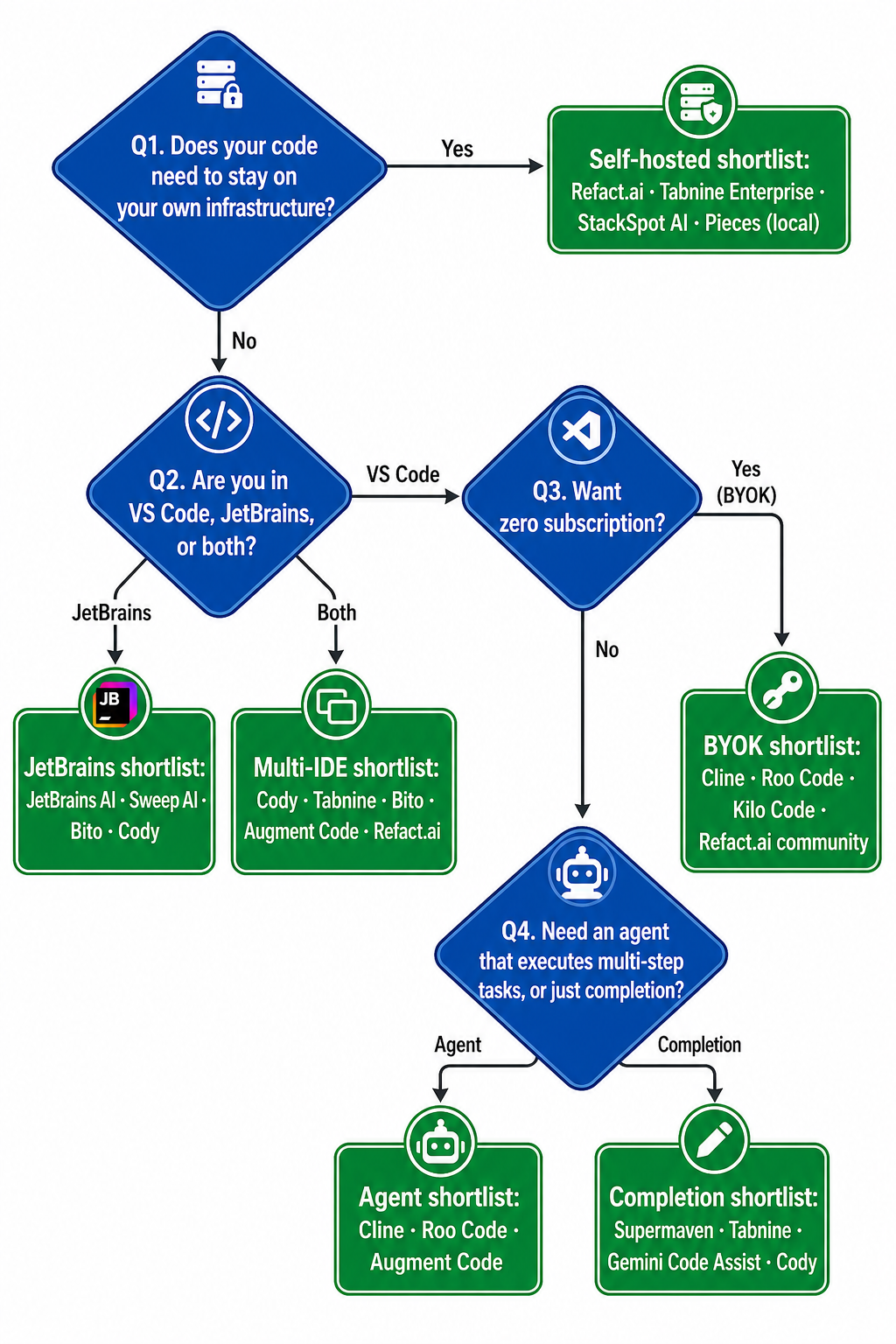
Read it as a sequence: privacy first (it's the only constraint that eliminates the most options), then host IDE, then subscription stance, then capability tier. Almost every selection mistake on this category comes from skipping the privacy question and discovering only at procurement that the chosen tool's data flow doesn't pass review.
All 19 IDE extensions, in one place
The full directory below the comparison table — each links to the dedicated profile page with feature deep-dives, pricing detail, and notes from our most recent review.
- Cline — Open-source AI coding agent in VS Code with direct access to frontier models and complete transparency. BYOK.
- Roo Code — Open-source autonomous agent inside VS Code with multi-step task execution and custom modes.
- Kilo Code — Open-source assistant for planning, building, and fixing code with transparent BYOK pricing.
- Refact.ai — Open-source autonomous agent with self-hosted deployment, zero telemetry, support for Claude 4, GPT-4.1, Gemini 2.5 Pro, and LLM fine-tuning on your own codebase.
- Tabnine — Privacy-first, personalisable AI code assistant with enterprise-grade security and self-hosted deployment options.
- Cody — Sourcegraph's multi-repository assistant with VS Code, JetBrains, and Visual Studio support and multiple AI models including Claude and GPT-4o.
- JetBrains AI — Native AI assistance integrated into JetBrains IDEs with multi-model support and offline capabilities.
- Sweep AI — JetBrains-native assistant with next-edit autocomplete and an integrated coding agent. 4.9 stars and 40 000+ Marketplace installs. Privacy Mode on all plans.
- Bito — Knowledge-graph–powered AI for VS Code and JetBrains, with architectural intelligence, feasibility analysis, and grounded code review.
- Sourcery — AI code reviewer that finds bugs, improves quality, and accelerates delivery velocity inside the IDE.
- CodeRabbit — AI-powered code review tool that delivers context-aware feedback on pull requests within minutes.
- Qodo — AI-powered code-integrity platform for generation, testing, and review workflows.
- Augment Code — Proprietary Context Engine that maintains live understanding of your entire codebase, with agentic task execution, GitHub code review, and a CLI agent.
- Amazon Q Developer — AWS-native AI assistant for building, securing, and operating software across the development lifecycle.
- Gemini Code Assist — Google's agentic pair programmer with a 1-million-token context window, generous free tier, and direct GCP integration.
- Supermaven — Lightning-fast autocomplete (under 250 ms) with a 1-million-token context window for whole-codebase awareness.
- StackSpot AI — Enterprise multi-agent platform for the full SDLC with VS Code and JetBrains integration, company-specific Knowledge Sources, and PCI-DSS / HIPAA / ISO 27001 compliance.
- Phind — AI-powered search engine and coding assistant for developers with VS Code extension, real-time web search, and codebase-aware chat.
- Pieces for Developers — Long-term memory layer for developers, with the LTM-2 memory engine, local Ollama support, and MCP integration.
Extension vs AI IDE vs CLI agent — when to pick which
This category page covers IDE extensions only. Two adjacent form factors solve overlapping problems and are easy to confuse:
| Form factor |
What it is |
Best when |
Trade-off |
| IDE extension (this page) |
A plug-in that loads inside VS Code, JetBrains, or Visual Studio and adds AI features to the editor you already use. |
You want AI without changing editors. Lowest switching cost. Most mature category. |
You inherit your editor's limits — context window, indexing speed, plugin conflicts. |
| AI-native IDE — see AI IDEs (Cursor, Windsurf, Zed, Void) |
A standalone editor designed around AI, often forked from VS Code with deeper hooks into the AI loop. |
You want the best AI experience and don't mind switching editors. Multi-file edits and agent flows tend to feel more native. |
You re-learn keybinds, lose some plug-ins, and bet on a younger ecosystem. |
| CLI agent — see CLI Agents (Claude Code, Aider, OpenAI Codex CLI) |
A terminal-resident agent that operates on your repo via shell, git, and your existing editor. |
You live in the terminal, want repo-wide refactors, or pair an agent with any editor (Vim, Emacs, JetBrains) without a plug-in. |
No inline completion. You'll juggle two windows. Less hand-holding for newcomers. |
If you're new to this category and just want code completion plus chat in your existing editor, stay on this page. If your tasks are multi-file refactors or whole-feature builds, also browse the AI IDEs and CLI Agents categories — most senior developers in 2026 run a hybrid setup.
How we ranked these
Each tool on this page is scored on five axes:
- Host IDE coverage — VS Code, JetBrains family, Visual Studio, Vim/Neovim. We weight breadth where it matters and depth where it doesn't.
- Entry pricing — true free tier, freemium, paid-only, BYOK, or enterprise. We separate "free" from "free trial" and from "free with mandatory telemetry."
- License — proprietary, open-source (with explicit license), or hybrid. OSS tools that depend on a proprietary backend are flagged.
- Primary model(s) — which LLM(s) actually power suggestions, and whether you can swap them.
- Capability tier — inline completion, chat, agent (multi-step task execution), or PR-level code review. Tools that ship multiple tiers are noted.
We re-verify entries quarterly. We do not accept paid placement for ranking. If a vendor changes pricing, license, or model defaults, we update the relevant row before the next quarterly review and stamp the table footer.
Common selection mistakes
Five recurring failure modes we see in evaluations:
- Choosing on price alone when JetBrains compatibility is a hard requirement. Several of the cheapest BYOK options (Cline, Roo Code, Kilo Code) are VS Code-only. If your team is JetBrains-first, look at JetBrains AI, Sweep AI, Bito, or Cody.
- Picking an open-source extension and forgetting the model still costs money. OSS BYOK tools have $0 platform fees but the underlying API calls (Claude, GPT, Gemini) are billed per token. Budget $5–$50/month per active developer depending on usage.
- Confusing a CLI agent for an IDE extension. Claude Code and Aider are powerful, but they live in your terminal, not in your editor. They appear in our CLI Agents category for that reason.
- Assuming "self-hosted" means "no telemetry." Some self-hosted options still phone home for usage analytics or model updates. If you need true air-gap, verify against the vendor's network-egress documentation. Refact.ai and Tabnine Enterprise are the strongest in this dimension.
- Buying an agentic tool when your team needs completion. Agents shine on multi-step tasks; they often underperform on inline tab-complete compared with completion-tuned tools like Supermaven or Tabnine. Match the tier to the workflow.
FAQ {#faq}
Which GitHub Copilot alternatives are free?
Six tools on this list have either a true free tier or full BYOK access with no platform subscription: Cline, Roo Code, Kilo Code, Refact.ai community, Gemini Code Assist (generous free tier), and Supermaven (free starter). With BYOK tools you still pay the model provider directly — typically a few dollars per million tokens consumed.
Which alternatives are self-hosted or zero-retention?
Self-hosted: Refact.ai (open-source, zero telemetry), Tabnine Enterprise, and StackSpot AI (PCI-DSS / HIPAA / ISO 27001 in scope). Zero-retention cloud: Sweep AI Privacy Mode (all plans) and Cody Enterprise. For local-first context capture, Pieces for Developers ships with local Ollama support out of the box.
Which alternatives work in JetBrains IDEs?
Tightest JetBrains integrations: JetBrains AI (native), Sweep AI (JetBrains-first, 40 000+ Marketplace installs), and Bito. Multi-IDE options that include solid JetBrains support: Cody, Tabnine, Augment Code, Refact.ai, Gemini Code Assist, Supermaven, and Amazon Q Developer.
How do I choose between these 19 alternatives?
Use the 4-question decision tree: privacy first (does your code need to stay on your machine?), then host IDE (VS Code, JetBrains, or both?), then subscription stance (free / BYOK / paid?), then capability tier (agent or completion?). The answers compound — by question four you'll usually have a shortlist of two or three to trial.
What's the difference between an IDE extension and an AI IDE like Cursor?
An IDE extension is a plug-in for an editor you already use (VS Code, JetBrains, Visual Studio). An AI-native IDE like Cursor or Windsurf is a standalone editor — usually a fork of VS Code — designed around AI from the ground up. Extensions have lower switching cost and broader plug-in ecosystems; AI-native IDEs offer a more cohesive multi-file and agentic workflow. See the AI IDEs category for the full list of full-IDE alternatives.
Related directories
Comparing AI coding tools beyond Copilot? These sister directories cover adjacent ecosystems:
Or browse other categories on this site: AI App Builders · AI IDEs · CLI Agents · Home.