Devin
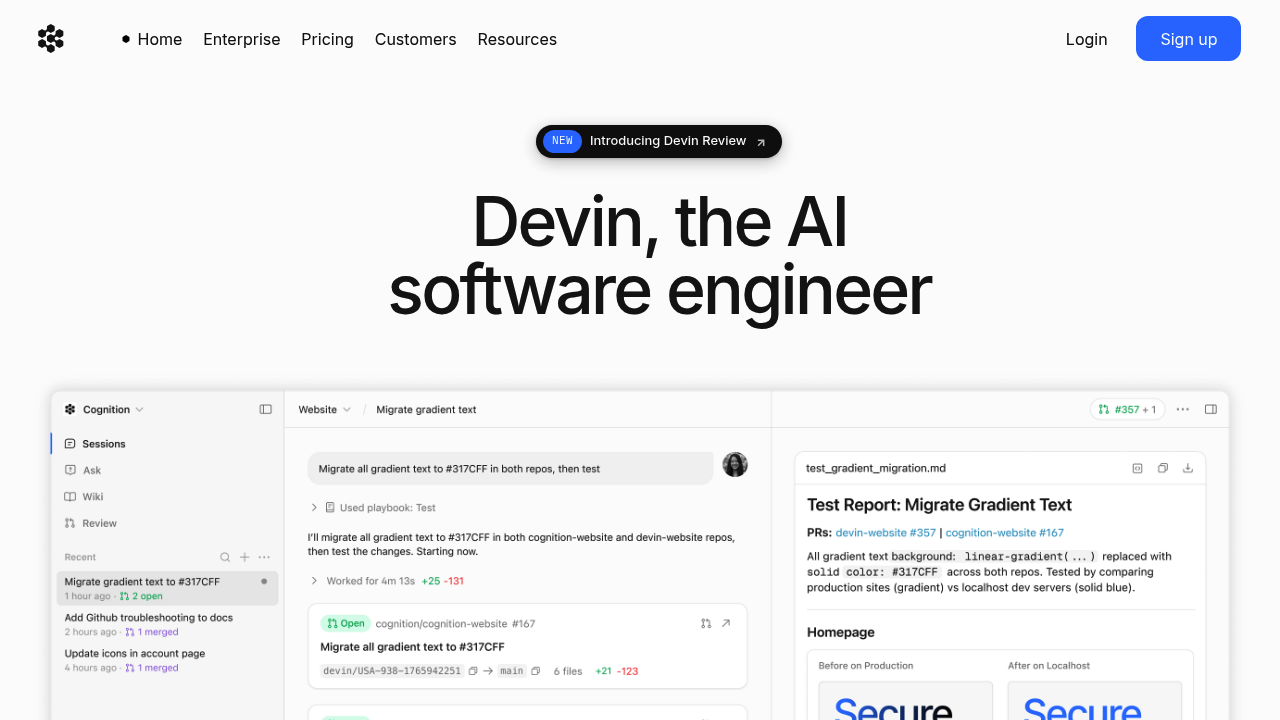
Devin is an autonomous AI software engineer by Cognition that independently plans, writes, debugs, and deploys software tasks end-to-end.
Devin: A GitHub Copilot Alternative for Autonomous Software Engineering
Devin is an autonomous AI software engineer developed by Cognition AI. Unlike traditional code completion tools, Devin can independently plan, write, debug, and deploy complete software projects end-to-end with minimal human intervention. As a GitHub Copilot alternative, it is best suited for engineering teams that want to delegate entire tasks—migrations, bug fixes, feature builds—rather than line-by-line code suggestions.
Devin vs. GitHub Copilot: Quick Comparison
| Devin | GitHub Copilot | |
|---|---|---|
| Type | Autonomous AI Software Engineer (Web + CLI) | IDE Extension / CLI |
| IDEs | Web UI, Slack integration, API access | VS Code, JetBrains, Vim, Neovim, Visual Studio, Xcode |
| Pricing | Starting at $20/mo (pay-as-you-go, ACU-based); Enterprise custom | Free for students/OSS; Individual $10/mo; Business $19/mo; Enterprise $39/mo |
| Models | Cognition proprietary models; not publicly disclosed | OpenAI GPT-4o, Claude 3.5 Sonnet, Gemini 1.5 Pro (multi-model) |
| Privacy / hosting | Cloud (Cognition AI infrastructure) | Cloud (GitHub/Microsoft) |
| Open source | No | No |
| Offline / local models | No | No |
Key Strengths
- True Autonomous Execution: Devin can take a high-level task description and independently execute all steps needed to complete it—writing code, running tests, debugging failures, reading documentation, and opening pull requests. This goes far beyond code completion into genuine autonomous software engineering. Engineers at Nubank reported 8–12x efficiency gains by delegating large code migration work to Devin.
- Long-Horizon Task Management: Unlike tools that assist with individual lines or functions, Devin can handle multi-file, multi-step engineering tasks that span hours of work. It maintains context across a full project, follows complex workflows, and adapts its approach based on real-time feedback from compilers, test runners, and APIs. This makes it particularly suited to tedious but complex work like codebase migrations, dependency upgrades, and cross-cutting refactors.
- Parallel Execution at Scale: Enterprise and team users can run multiple Devin instances in parallel, dramatically compressing timelines for large-scale technical work. Cognition's infrastructure allows deploying an "army of Devins" to process independent subtasks simultaneously. This parallel model is what enabled Nubank to achieve over 20x cost savings on their ETL migration project.
- Fine-Tuning and Learning: Devin improves performance on repeated task types through fine-tuning on domain-specific examples. Teams can provide examples of previously completed tasks to help Devin learn the patterns and conventions specific to their codebase, achieving compounding improvements over time.
Known Limitations
- Higher Cost for Casual Use: Devin's pricing model is usage-based (ACUs — Agent Compute Units), starting at $20/month for approximately 9 ACUs at $2.25 per ACU. For individual developers who only want code suggestions while typing, this is significantly more expensive than alternatives like GitHub Copilot Individual at $10/month or even Supermaven's free tier. Devin is economically justified primarily when delegating full tasks, not for lightweight autocomplete workflows.
- Not an In-IDE Experience: Devin operates primarily through a web UI and Slack integration, not as a native plugin inside your editor. Developers who prefer staying in VS Code or JetBrains and getting real-time suggestions will need to adapt their workflow significantly to use Devin effectively. There is no autocomplete or inline suggestion feature comparable to GitHub Copilot's real-time assist.
- Requires Oversight for Critical Code: Devin is autonomous, but its outputs still require human review before merging to production. While it opens pull requests and provides reasoning, engineering teams must maintain code review processes to catch subtle bugs or violations of internal conventions that Devin may miss.
Best For
Devin is best suited for mid-size to large engineering teams with substantial technical debt or large-scale migration projects. It excels in situations where the problem is well-defined but the execution is tedious and repetitive at scale—such as refactoring monoliths, upgrading frameworks, fixing classes of bugs across many files, or building new features from detailed specifications. Startups and individual developers with budget constraints are better served by cheaper tools, but teams that have priced out the engineering hours for a multi-month project should consider Devin's economics carefully.
Pricing
- Core (Pay-as-you-go): Starting at $20/month, which provides approximately 9 ACUs (Agent Compute Units) at $2.25/ACU. Additional ACUs billed at the same rate.
- Teams / Enterprise: Volume pricing with lower ACU costs. On the $500/month plan, ACUs drop to $2.00 each. Enterprise contracts available with custom pricing, SLAs, and dedicated support.
Prices are subject to change. Check the official pricing page for current details.
Tech Details
- Type: Autonomous AI Software Engineer (Web UI + CLI + API + Slack)
- IDEs: Not a traditional IDE plugin; accessed via web browser, Slack, and REST API
- Key features: Full task autonomy, multi-file editing, terminal access, web browsing, PR creation, fine-tuning support, parallel agent execution
- Privacy / hosting: Cloud-hosted by Cognition AI; enterprise data processing agreements available
- Models / context window: Proprietary Cognition models; not publicly documented
When to Choose This Over GitHub Copilot
- You need to delegate complete engineering tasks—entire features, migrations, or refactors—not just get suggestions while typing.
- You have repetitive, high-volume work (e.g., migrating 10,000+ files) where Devin's parallel execution provides 10–20x throughput improvements over manual engineering.
- Your team wants to compress project timelines by running multiple autonomous agents in parallel rather than waiting for human engineers to sequence work.
- You need an AI that can use terminals, run tests, read documentation, and browse the web to resolve blockers on its own—not just write code inline.
When GitHub Copilot May Be a Better Fit
- You want real-time inline code suggestions and tab-completion directly in your IDE while you type, which Devin does not provide.
- You are an individual developer or small team with limited budget—GitHub Copilot Individual at $10/month is significantly more cost-effective for everyday coding assistance.
- You prefer a tool that works entirely within your existing IDE without changing your development workflow or requiring task delegation to an external system.
Conclusion
Devin represents a fundamentally different approach to AI-assisted development: instead of helping you write code faster, it writes entire programs for you. Engineering teams facing large-scale migration projects, significant technical debt, or repetitive feature work at scale will find Devin's autonomous execution model compelling. For everyday inline coding assistance, traditional IDE-based tools remain more practical and cost-effective.
Sources
FAQ
Is Devin free?
Devin is not free. It starts at $20/month on the pay-as-you-go Core plan, which provides approximately 9 ACUs (Agent Compute Units). There is no permanent free tier, though Cognition may offer trials for new users.
Does Devin work with VS Code?
Devin does not integrate as a VS Code extension. It operates through its own web UI, a Slack integration, and a REST API. You interact with Devin by assigning it tasks and reviewing pull requests, not by using it inside your editor.
How does Devin compare to GitHub Copilot?
GitHub Copilot provides real-time inline code suggestions inside your IDE, making it a typing accelerator for individual developers. Devin is an autonomous agent that executes complete software engineering tasks end-to-end. They are complementary tools targeting different workflows: Copilot enhances daily coding; Devin delegates whole tasks.
What kinds of tasks is Devin best at?
Devin excels at well-defined, repetitive-but-complex tasks at scale: large codebase migrations, framework upgrades, bug triage and fixing across many files, building features from detailed specs, and writing/running test suites. It is not optimized for exploratory or highly creative programming work where requirements change rapidly.