DhiWise
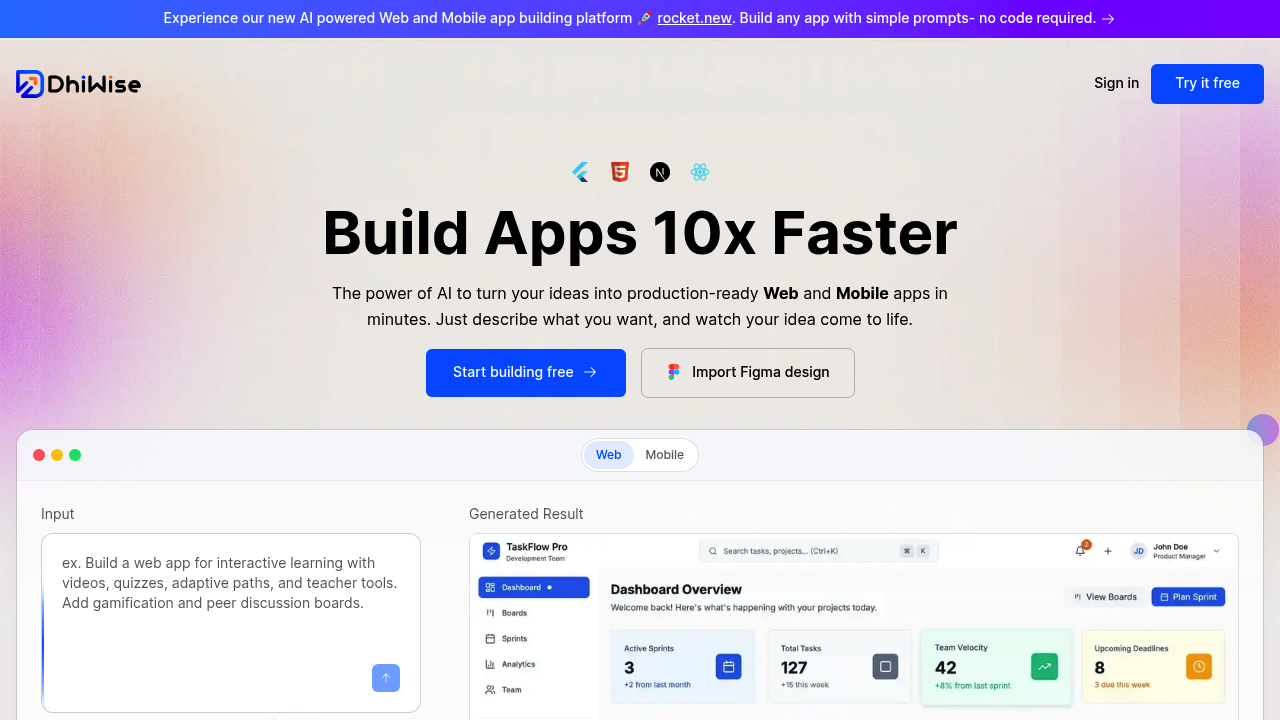
AI-powered platform that converts Figma designs and natural language descriptions into production-ready web and mobile applications.
DhiWise - Github Copilot alternative
DhiWise is an AI-driven application generator that transforms visual designs and text prompts into complete, framework-specific codebases. It differs from inline code completion tools by generating entire application structures with proper component architecture, routing, and integrations. Solo developers prefer it when they need to ship full applications quickly, converting design mockups into React, Next.js, Flutter, or HTML/CSS projects without writing boilerplate code. The platform positions itself as a Github Copilot alternative by focusing on full-stack app generation rather than line-by-line suggestions.
Strengths
- Design-to-code conversion: Transforms Figma designs into pixel-perfect, production-ready code with proper component structure and responsive layouts across multiple frameworks.
- Full application generation: Creates complete app architectures from natural language prompts, including routing, state management, API integrations, and deployment configurations.
- Framework flexibility: Supports React, Next.js, Flutter, and HTML/CSS with modern patterns like Tailwind CSS, enabling cross-platform development from a single design source.
- Pre-built integrations: Connects directly with Supabase, GitHub, OpenAI, Anthropic, Google Analytics, Stripe, and Netlify, eliminating manual integration setup time.
- Code ownership and export: Generates clean, modular code that can be exported to GitHub or VS Code, allowing developers to modify and extend applications outside the platform.
- Enterprise security model: Provides authentication scaffolding, data validation, and security best practices in generated code, with options for private model training on proprietary codebases.
Weaknesses
- Limited IDE integration: Primarily operates as a web-based platform rather than a native IDE extension, requiring context switching between design tools and the DhiWise interface.
- Learning curve for advanced customization: Generated code follows opinionated architectural patterns that may require familiarity with the platform's structure to modify effectively.
- Pricing transparency: Specific pricing details are not publicly disclosed on the main website, requiring direct contact for enterprise or team plans.
- Not suitable for incremental coding: Designed for generating complete applications rather than assisting with inline code completion or refactoring existing codebases.
Best for
Solo developers, small teams, and agencies building client projects who need to rapidly convert design mockups into deployable applications across web and mobile platforms.
Pricing plans
- Free Tier — Unknown — Key limits unknown
- Pro Plan — Starting at $149/month (reported) — Key limits unknown
- Enterprise Plan — Custom pricing — Key limits unknown
Note: Multiple sources report varying pricing structures ($5/screen for design-to-code, $299 starting price, $149/month). Contact DhiWise directly for current pricing.
Tech details
- Type: AI-powered application generator and design-to-code platform
- IDEs: Web-based platform with VS Code extension for code assistance; exports to GitHub and VS Code for local development
- Key features: Figma-to-code conversion, natural language app generation, API integration automation, one-click deployment to Netlify, real-time collaboration, custom design system support, multi-framework output
- Privacy / hosting: Generated code is fully exportable and self-hostable; enterprise options support private model training on customer codebases; no vendor lock-in after code export
- Models / context window: Powered by large language models (specific models not disclosed); supports design file analysis and natural language processing for app requirements; context includes entire design systems and application architectures
When to choose this over Github Copilot
- Full application scaffolding needed: When starting projects from scratch and requiring complete app structures with routing, state management, and deployment configurations rather than line-by-line suggestions.
- Design-first workflow: When working with Figma designs that need pixel-perfect translation to code across multiple frameworks without manual component creation.
- Cross-platform mobile development: When building Flutter applications from designs, eliminating the need to manually translate UI mockups into widget trees and platform-specific code.
When Github Copilot may be a better fit
- Incremental development in existing codebases: When working within established projects that require inline suggestions, refactoring assistance, and contextual code completion rather than new app generation.
- IDE-native workflow preference: When developers prefer seamless integration within their existing IDE without switching to web-based platforms for code generation.
- Algorithm and logic implementation: When the primary need is assistance with complex algorithms, data structures, and business logic rather than UI scaffolding and application architecture.
Conclusion
DhiWise serves a distinct niche as a Github Copilot alternative by targeting the application scaffolding phase rather than incremental coding. Its strength lies in accelerating the design-to-deployment pipeline for new projects across web and mobile platforms. While it cannot replace IDE-integrated assistants for ongoing development work, it significantly reduces time-to-market for teams converting design mockups into functional applications. The platform is most valuable when rapid prototyping, client delivery speed, and cross-platform consistency are primary concerns.
Sources
- Official site: https://www.dhiwise.com/
- Docs: https://www.dhiwise.com/post/dhiwise-vs-ai-coding-assistants-comparison
- Pricing: https://www.dhiwise.com/ (contact for details)
FAQ
Q: Is DhiWise a direct replacement for GitHub Copilot?
No. DhiWise focuses on generating complete applications from designs or prompts, while GitHub Copilot provides inline code suggestions within your IDE. DhiWise is ideal for starting new projects quickly, whereas Copilot excels at assisting with ongoing development in existing codebases.
Q: Can I export and modify the code generated by DhiWise?
Yes. DhiWise generates clean, modular code that can be exported to GitHub or VS Code. You maintain full ownership and can modify the codebase without platform lock-in. The generated code follows framework best practices and includes proper component structure.
Q: What frameworks and platforms does DhiWise support?
DhiWise supports React, Next.js, Flutter, HTML/CSS, and includes integration with Tailwind CSS for styling. It can generate web applications, cross-platform mobile apps, and static websites from Figma designs or natural language descriptions.
Q: How does DhiWise handle code privacy and security?
DhiWise offers enterprise-grade security features including authentication scaffolding and data validation in generated code. Enterprise plans support private model training on customer codebases. All generated code is exportable, ensuring you retain complete control over your intellectual property.
Q: Do I need coding experience to use DhiWise effectively?
Basic coding knowledge is helpful for customizing generated applications, but DhiWise enables users to create functional apps through natural language prompts and design uploads. Developers with framework experience (React, Flutter) will find it easier to extend and modify the generated code.
Q: What is the difference between DhiWise and Rocket.new?
DhiWise has evolved and now operates under the Rocket.new brand for its AI app generation capabilities. The core functionality remains the same—converting designs and ideas into production-ready applications with AI assistance.