Cursor
Cursor - Github Copilot alternative
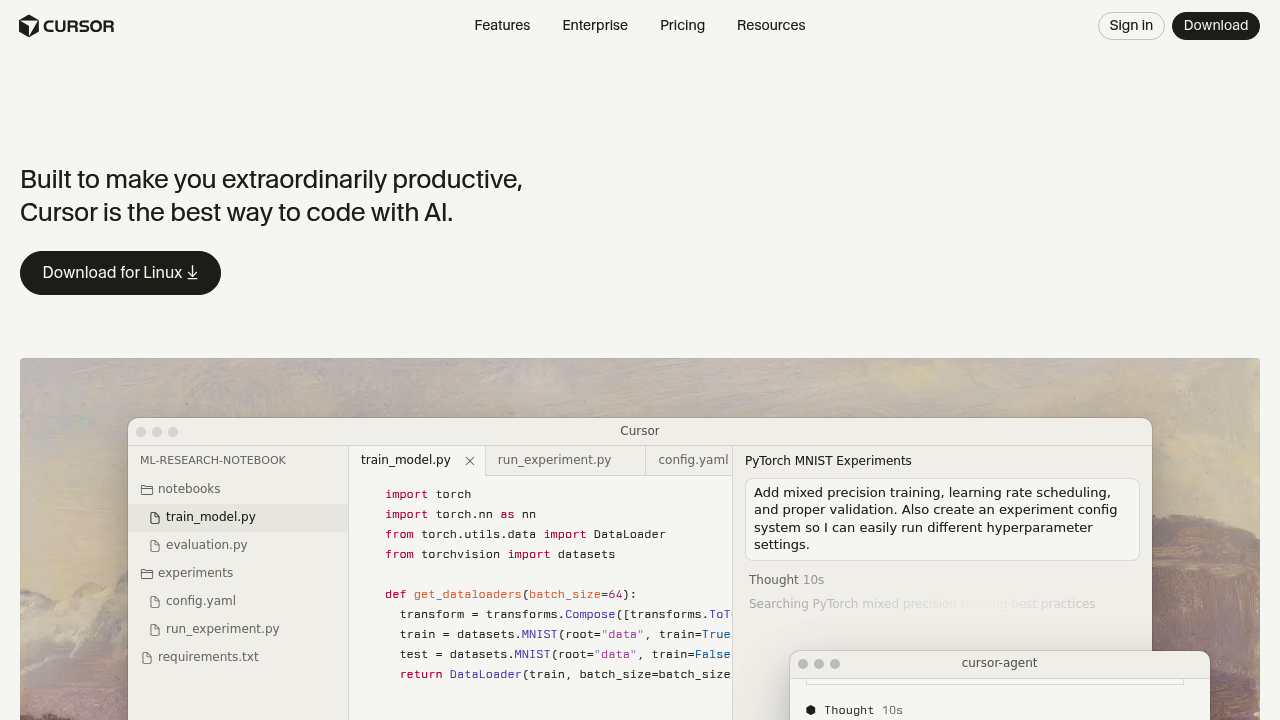
Cursor is a fork of Visual Studio Code with integrated AI features including code generation, smart rewrites, and codebase queries. It routes requests to frontier models like Claude Sonnet 4, GPT-4.1, and Gemini 2.5 Pro. The background agent mode allows autonomous task completion across multiple files in isolated Ubuntu environments. Solo developers benefit from native VS Code compatibility, custom autocomplete models, and flexible privacy controls without vendor lock-in.
Strengths
- Agent mode autonomy — Analyzes requests and codebase context to search documentation, identify relevant files, and understand current implementations autonomously.
- Multi-model flexibility — Supports Claude Sonnet 4, OpenAI o3-pro, GPT-4.1, Gemini 2.5 Pro, Claude Opus 4, and more with automatic routing based on task and reliability.
- Extended context windows — Standard 200k token context (~15,000 lines) with Max Mode extending to full model limits for Gemini 2.5 Pro and GPT-4.1.
- VS Code ecosystem compatibility — As a VS Code fork, Cursor maintains compatibility with existing extensions, themes, and workflows.
- Granular privacy controls — Privacy mode guarantees code never stored by model providers or used for training, with zero data retention agreements across all AI vendors.
- Custom autocomplete models — Cursor Tab feature powered by proprietary models provides more powerful suggestions than standard Copilot with better memory.
Weaknesses
- Not fully self-hosted — Requests always route through Cursor's AWS infrastructure even with custom API keys; no self-hosted server deployment option currently available.
- Higher cost for power users — Ultra plan at $200/month required for heavy agent usage, significantly more expensive than flat-rate alternatives.
- Codebase indexing limitations — Indexing feature experiences heavy load causing request failures, requiring multiple upload attempts before files fully index.
- Workspace Trust disabled — Security feature disabled by default to prevent confusion with Privacy Mode, potentially reducing protection from malicious folders.
Best for
Individual developers and small teams who need autonomous multi-file editing, want to avoid model vendor lock-in, require strong privacy guarantees, and already work in VS Code.
Pricing plans
- Hobby — Free — Limited completions, basic features, no usage credits included.
- Pro — $20/month — Includes $20 of agent model usage at API prices, priority features, unlimited Auto model selection.
- Ultra — $200/month — For power users, includes significantly higher agent usage limits, priority access to new features.
- Teams — $40/user/month — All Pro features plus centralized billing, usage analytics, org-wide privacy controls, role-based access.
- Enterprise — Custom pricing — All Teams features plus SAML/OIDC SSO, custom contracts, dedicated support.
- Bugbot add-ons — $40/month (Pro), $40/user/month (Teams), Custom (Enterprise) — Additional automated debugging capabilities.
Tech details
- Type: AI-native code editor (VS Code fork)
- IDEs: Standalone desktop application (Windows, macOS, Linux); not available as extension for other IDEs
- Key features: Agent mode for autonomous coding tasks; Cursor Tab autocomplete with custom models; chat with codebase; multi-file edit; inline code generation; natural language commands; semantic codebase indexing with vector search
- Privacy / hosting: Cloud-based with infrastructure primarily on AWS US servers, some in Tokyo and London regions. Privacy mode ensures code never stored or used for training with zero data retention agreements. Codebase indexing stores obfuscated file paths and embeddings on Turbopuffer. No self-hosted option available.
- Models / context window: Claude Sonnet 4, OpenAI o3-pro, GPT-4.1, Gemini 2.5 Pro, Claude Opus 4, Grok 4. Standard 200k token context window with Max Mode extending to full model limits. Custom proprietary models power Tab autocomplete and Apply features.
When to choose this over Github Copilot
- Multi-file autonomous editing — Background agents can execute complex tasks across multiple files asynchronously in isolated environments, far beyond Copilot's single-file suggestions.
- Model flexibility without lock-in — Choose from multiple frontier models with automatic routing based on task requirements and current reliability, versus being limited to OpenAI models.
- Enhanced privacy guarantees — Parallel infrastructure for privacy mode users with zero data retention agreements across all providers, offering stronger guarantees than Copilot's standard terms.
When Github Copilot may be a better fit
- Enterprise GitHub integration needs — Organizations heavily invested in GitHub ecosystem may prefer native integration with Actions, Codespaces, and enterprise authentication systems.
- Predictable flat-rate pricing — Copilot's fixed monthly cost is simpler for budgeting compared to Cursor's usage-based Pro limits requiring monitoring.
- IDE diversity requirements — Teams using JetBrains IDEs, Vim, Neovim, or other non-VS Code editors cannot use Cursor's standalone application.
Conclusion
Cursor distinguishes itself as an AI-first code editor where every feature integrates intelligent assistance. The autonomous agent capabilities and multi-model flexibility provide substantial advantages for complex refactoring and large-scale changes. Strong privacy guarantees with SOC 2 Type II certification and zero data retention agreements make it viable for sensitive codebases. However, cloud-only deployment and usage-based pricing at higher tiers require careful evaluation against specific team needs.
Sources
- Official site: https://cursor.com/
- Docs: https://docs.cursor.com/
- Pricing: https://cursor.com/pricing
FAQ
Can I use Cursor with my existing VS Code setup?
Yes. Cursor is a fork of Visual Studio Code and maintains compatibility with VS Code extensions, themes, and settings. You can import your VS Code configuration and extensions directly into Cursor.
Does Cursor work offline or require internet connection?
Cursor requires an internet connection for AI features. All AI requests route through Cursor's infrastructure on AWS before reaching model providers. Basic code editing works offline, but autocomplete, chat, and agent features require connectivity.
How does Privacy Mode protect my code?
Privacy mode guarantees code is never stored by model providers or used for training through parallel infrastructure that separates privacy mode requests. All providers including OpenAI, Anthropic, Google, and xAI have zero data retention agreements. Data is deleted immediately after each request.
What happens if I exceed my Pro plan usage limits?
When you exceed your limit, Cursor will ask you to upgrade to Ultra or switch to an unlimited model selection. The $20 Pro plan includes at least $20 of agent model inference at API pricing per month.
Can I use my own API keys instead of Cursor's credits?
Some features including Tab autocomplete and Apply from Chat are powered by custom models and cannot be charged to an API key. Even with custom API keys configured, requests still route through Cursor's infrastructure for prompt building.
How does Agent mode differ from regular chat?
Agent mode analyzes your request and codebase context to search documentation, identify relevant files, and understand current implementation autonomously. Background agents run in isolated Ubuntu-based environments and can execute commands and modify multiple files, unlike chat which provides suggestions you implement manually.