Continue
Continue - Github Copilot alternative
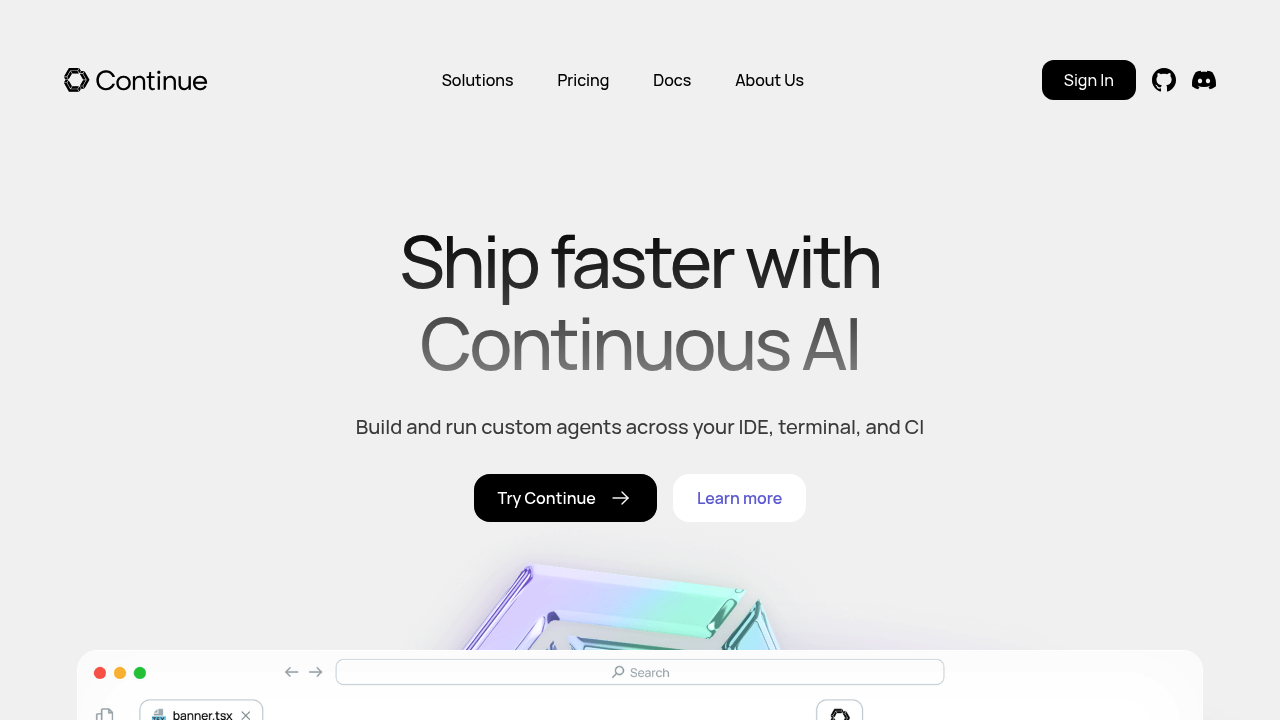
Continue is an open-source IDE extension for VS Code and JetBrains that enables developers to build custom AI code assistants. Users can connect any model, define custom rules, and integrate community MCP tools without usage limits or vendor restrictions. Solo developers value the freedom to experiment with different AI providers and build personalized coding workflows. Continue includes chat, autocomplete, edit, and agent features for comprehensive code assistance.
Strengths
- Complete model flexibility allows connection to any AI provider including OpenAI, Anthropic, Azure OpenAI, Ollama, and local models. Developers can switch providers based on task requirements or cost.
- Open-source architecture under Apache 2.0 license eliminates vendor lock-in. Code and configurations remain under user control with no proprietary restrictions.
- Terminal-native CLI tool enables automated AI coding in CI/CD pipelines, batch processing, and server deployments. Extends beyond IDE usage.
- Support for Model Context Protocol (MCP) tools provides access to community-built integrations. Extends assistant capabilities beyond basic code completion.
- Codebase context awareness and URL crawling augment chat responses with relevant project information. Reduces need for manual context provision.
- Configuration via YAML files allows version-controlled, shareable assistant setups. Teams can standardize on specific models and rules.
Weaknesses
- Initial setup requires JSON/YAML configuration for certain providers like Azure OpenAI. Less streamlined than plug-and-play alternatives.
- Feature-rich interface may present steeper learning curve for developers expecting simpler tools. Requires time investment to master customization options.
- Autocomplete performance depends on chosen model and provider. Self-hosted models may introduce latency compared to optimized cloud services.
- Documentation quality varies across different providers and features. Community-driven support requires active troubleshooting.
Best for
Developers who prioritize flexibility over convenience, teams requiring model governance, organizations with privacy requirements for self-hosted deployment, and engineers comfortable with configuration-based tools who want complete control over their AI coding assistant.
Pricing plans
- Free (Open Source) — $0/month — Unlimited usage when using own API keys. No seat limits. Self-hosted. Bring your own models.
- Models Add-On — Unknown — Flat monthly fee for frontier model access. Specific pricing tiers not publicly disclosed.
- Team Plan — Unknown — Centralized configuration and credential management. Pricing available on request.
- Enterprise Plan — Unknown — Governance controls, audit logs, and deployment options. Contact sales for pricing.
Tech details
- Type: Open-source IDE extension + CLI tool
- IDEs: VS Code (Marketplace), JetBrains (Plugin Repository), terminal CLI
- Key features: Chat for LLM assistance, autocomplete for inline suggestions, edit for in-file modifications, agent for substantial codebase changes. Custom rules, prompt templates, context providers, MCP server integration.
- Privacy / hosting: Self-hosted deployment option available. Local model support via Ollama. Configurations stored in .continue folder (~/.continue on Mac, %USERPROFILE%.continue on Windows). Data retention controlled by chosen provider.
- Models / context window: Supports any provider through config.yaml with customizable contextLength parameter. Examples include Claude Opus 4 with 200K context window, Codestral for specialized coding tasks. Context size varies by selected model.
When to choose this over Github Copilot
- You require flexibility to switch between multiple AI providers or use local models without external dependencies. Continue eliminates vendor lock-in.
- Your workflow includes terminal-based development or CI/CD automation requiring command-line AI assistance. Continue offers CLI and IDE integration.
- You need centralized team configuration with governance over allowed models, rules, and tools. Continue Hub provides policy enforcement.
When Github Copilot may be a better fit
- You prefer zero-configuration setup with immediate productivity. GitHub Copilot requires minimal onboarding effort.
- Your organization already standardizes on GitHub tooling and wants seamless ecosystem integration. Native GitHub features provide tighter coupling.
- You value highly optimized autocomplete latency over model choice flexibility. GitHub's proprietary infrastructure may deliver faster inline suggestions.
Conclusion
Continue positions itself as the open-source alternative for developers who demand control over their AI coding tools. The platform excels in scenarios requiring model flexibility, team governance, or self-hosted deployment. While the configuration-driven approach requires initial time investment, it rewards users with unprecedented customization capabilities. Organizations seeking to avoid vendor lock-in or experiment with emerging AI models will find Continue's architecture particularly valuable.
Sources
- Official site: https://www.continue.dev/
- Documentation: https://docs.continue.dev/
- GitHub repository: https://github.com/continuedev/continue
- Pricing: https://hub.continue.dev/pricing
- VS Code Marketplace: https://marketplace.visualstudio.com/items?itemName=Continue.continue
FAQ
Can Continue work completely offline with local models?
Yes. Continue supports local model deployment through Ollama integration. Install Ollama locally, download desired models, and configure Continue to use the Ollama provider. This enables fully offline coding assistance without internet connectivity or external API calls.
How does Continue compare in autocomplete speed to GitHub Copilot?
Autocomplete latency varies significantly based on chosen model and hosting. Cloud-hosted frontier models typically match GitHub Copilot's response times. Local models may introduce 1-3 second delays depending on hardware. Users prioritizing speed should select optimized autocomplete models and cloud hosting.
What AI models work with Continue?
Continue supports any model through its provider system including OpenAI GPT-4, Anthropic Claude, Azure OpenAI, local Ollama models, Mistral, Together AI, and custom API endpoints. Configure providers in config.yaml with API credentials. Model switching requires configuration changes but involves no code modifications.
Does Continue require programming knowledge to configure?
Basic YAML syntax understanding suffices for standard configurations. Config.yaml uses straightforward key-value structure for models, context providers, and rules. Advanced features like custom MCP servers or prompt templates require deeper technical knowledge. Documentation provides copy-paste examples for common setups.
Can teams share Continue configurations across developers?
Continue configurations can be placed in workspace root (.continue folder) to automatically apply to all team members working in that repository. Continue Hub offers centralized team configuration management with allowlists for approved models and tools. Version control YAML files for standardization.
What data does Continue send to AI providers?
Data transmission depends entirely on chosen provider. Continue acts as a client that sends prompts and code context to configured model endpoints. Using local Ollama models keeps all data on-device. Cloud providers receive code snippets based on context settings. Review individual provider privacy policies for retention details.